

I’ve never used an iPad as much as an iPhone or MacBook, but there’s one thing about Apple that has bothered me for years. I get the impression that the company constantly finds new reasons to convince us that the device we already own is no longer good enough. Actually, the more I think about it, the entire tech industry operates that way. I know big companies need to sell new products. But I’m allowed to find that annoying, right?
Most iPads can remain useful for five to eight years, and some last even longer. For anyone who asks how long do iPads last, I’d use that range as a realistic estimate rather than a guarantee. Apple announced iPadOS 27 on June 8, 2026, and released it on September 14. Five older models lost support, including the eighth-generation iPad released in 2020. Apple’s official compatibility list confirms that the oldest supported models now date back to 2020.
I can imagine how frustrating it must be to own an iPad with a perfectly good screen and enough power for everyday tasks, only to discover that it has received its last major software upgrade. Let’s look at what changed, how much life those older models still have, and when a new iPad makes sense.
Why Did iPadOS 27 Leave Five iPad Models Behind?
When Apple introduced iPadOS 27, I immediately checked the compatibility list. I’ve followed personal technology long enough to remember when a new software version could make an older device feel surprisingly fresh. Now I’m especially interested in the point where manufacturers decide to stop that support.
According to MacRumors’ June 8 report, Apple ended major iPadOS upgrades for the last five models with A12 and A12X processors.
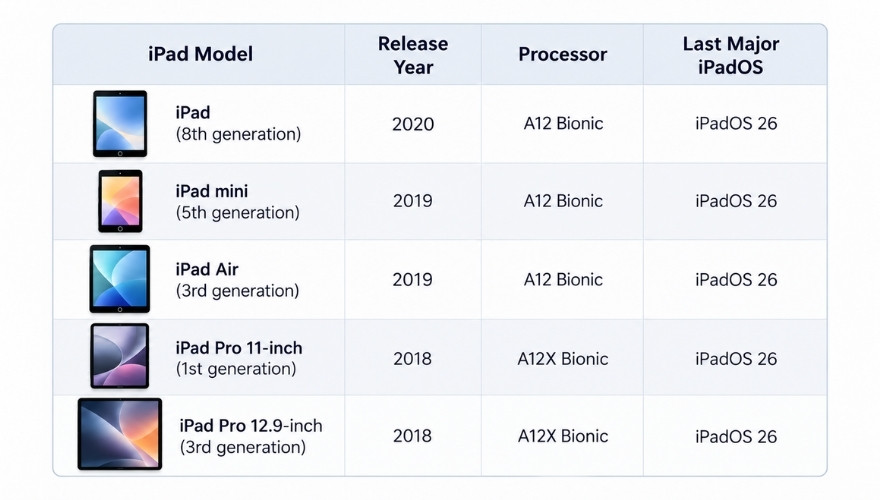
The first 11-inch iPad Pro and third-generation 12.9-inch model received roughly eight years of major software upgrades. I consider that a respectable result. The basic iPad from 2020 reached the same point after about six years.
That two-year difference is one reason how long do iPads last deserves a model-specific answer. Apple has supported some premium models longer than its entry-level tablets, although past support periods offer no guarantee for future releases.
Still, Age Isn’t the Whole Story
Take the 2020 iPad Pro. Its 11-inch and 12.9-inch versions use the A12Z Bionic and remain compatible with iPadOS 27. Their predecessors, which use the A12X, have reached the end of major system upgrades.
The technical difference is smaller than you might expect. The A12Z has eight active GPU cores, compared with seven in the A12X. A MacRumors report based on TechInsights’ chip analysis found that the two processors share essentially the same silicon design, with an additional GPU core enabled in the A12Z.
Apple has offered no technical explanation that identifies that extra core as the reason for its iPadOS 27 decision.
If I were about to buy a used iPad Pro, I’d check Settings → General → About and confirm the exact model. Apple’s model identification guide can help with that.
It’s a far better way to approach how long do iPads last than to assume that every iPad purchased in the same year has the same software future.
Older iPads Can Still Receive Security Updates
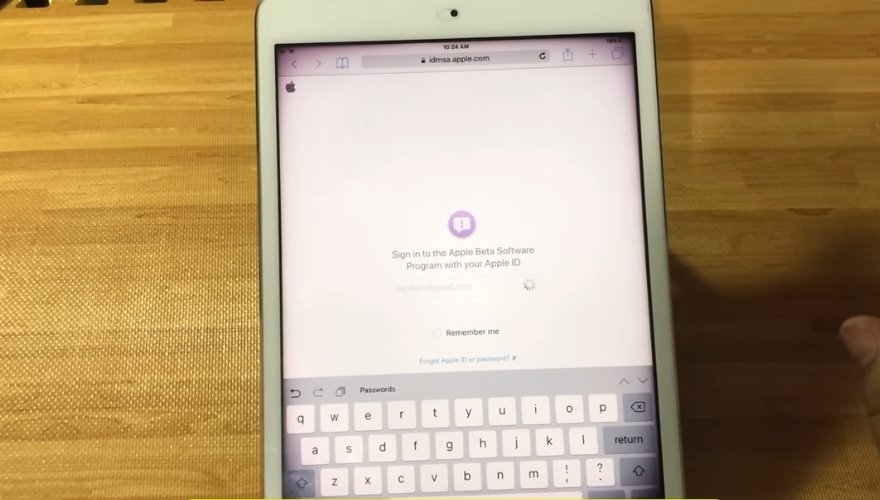
Here’s a detail I consider more important than most new features. Major iPadOS releases introduce new capabilities. Security patches protect devices against known vulnerabilities, and Apple can continue to issue them for an older version of its software.
On September 28, 2026, Apple released iPadOS 26.7.1 for all five models that lost iPadOS 27 support. According to Apple’s official security notice, the update addressed CVE-2026-86950, a CoreGraphics vulnerability that could allow arbitrary code execution through a malicious file. Apple also acknowledged a report of possible exploitation in sophisticated attacks against specific individuals.
Consider someone with a fifth-generation iPad mini from 2019. The tablet can remain on iPadOS 26 and still receive that September security patch. The owner can open Settings → General → Software Update to check for an available update without the need for a new device.
That’s a useful distinction when someone asks how long do iPads last after their final major iPadOS release. The tablet may remain secure enough for continued use as Apple issues appropriate fixes, but the company has yet to promise an end date for security support on each model.
App compatibility creates a separate limit. A developer can raise the minimum iPadOS requirement, which may eventually prevent an older tablet from installing a necessary app update. I’d take that problem seriously if the device were essential to my work.
The Battery Gives Another Answer to How Long an iPad Can Last
Battery condition is the next place I’d look. I find it particularly useful when someone asks how long do iPads last, because Apple publishes a measurable specification rather than a vague estimate.
According to Apple’s iPad battery documentation, iPad batteries are designed to retain 80% of their original capacity after 1,000 complete charge cycles, subject to normal variations in use and charge habits.
But what does 1,000 cycles mean in years? I calculated three examples based on a consistent daily rate of battery use.
One complete cycle represents a total discharge equal to 100% of the battery’s capacity. You could use 50% today and another 50% tomorrow to complete approximately one cycle.
For a real-world look at iPad battery life during everyday tasks, check out RaavMedia’s iPad battery test, which covers web browsing, YouTube, movie streaming, gaming, and 4K video editing.
There’s another detail worth checking before a repair. Apple’s Battery Health feature is available on selected newer iPads, including the M4 iPad Pro and M2 or later iPad Air models. Older iPads generally lack the same built-in battery-health screen.
For one of those older tablets, I’d ask Apple or an authorized service provider to assess the battery before spending money on a replacement device. Apple offers battery service options, although availability and cost depend on the model and service terms.
If the tablet still handles my daily tasks and receives appropriate security updates, replacing a worn battery seems much more sensible than replacing the entire iPad.
Here’s Something Interesting: iPadOS 27 Doesn’t Guarantee Apple Intelligence
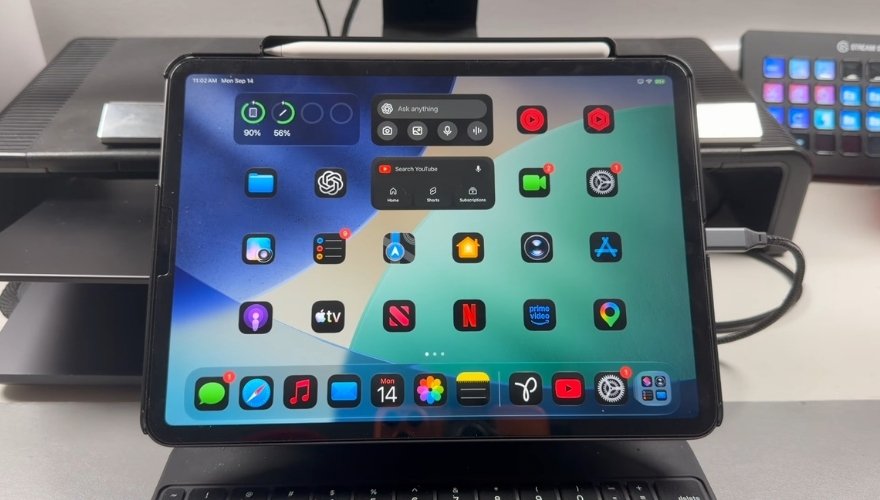
I find this part of Apple’s strategy particularly interesting. Two iPads can run the same version of iPadOS and still offer very different features.
The ninth-generation iPad and fourth-generation iPad Air both support iPadOS 27. Their processors, however, fall below Apple’s requirements for Apple Intelligence.
According to Apple’s official AI requirements, Apple Intelligence on iPad requires an M1 processor or later, or an iPad mini with the A17 Pro chip.
The latest AI system also has an additional memory distinction. For iPads with M4 or later processors and at least 12GB of unified memory, Apple lists up to 14GB of required local storage. Other Apple Intelligence-compatible iPads require up to 8GB.
I find those figures revealing. A newer processor can affect the AI features available to the owner even when an older device runs the latest operating system. Individual features may also depend on language or regional availability.
So how long do iPads last for someone who wants Apple’s most advanced AI capabilities? The useful lifespan could be shorter than it is for a person who mainly uses Safari or reads books.
Personally, I’d be curious to try the new tools. But I’d have a hard time justifying several hundred dollars for another iPad unless I knew exactly which feature would improve my everyday use.
Apple may also be exploring new wearable devices, including a screenless fitness band that could compete with Whoop and Garmin.
When Would I Actually Replace My Old iPad?
I love new devices, and even minor changes to processors can catch my attention. But when it’s time to pay for one, I become much more careful. If I owned a six- or seven-year-old iPad today, I’d want a specific reason to replace it.
For me, how long do iPads last becomes a much easier question once I know what the owner needs the tablet to do. First, I’d check security support. As long as Apple provides relevant patches, I’d have a stronger reason to keep the device. Once support ends completely, I’d plan a replacement, especially if I use the tablet for sensitive business accounts.
Next, I’d check essential apps. Imagine that a work app raises its minimum iPadOS requirement. You still have a functional tablet, but the software you depend on can no longer receive the version you need. I’d check the developer’s support policy and the available alternatives before making a purchase decision.
Third, I’d assess the battery and repair cost. If a battery replacement restores the daily runtime I need at a reasonable price, I’d choose the repair. If the tablet also has serious screen damage or another expensive hardware fault, the financial argument for a new device becomes stronger.
I’d also check free storage and overall performance. Apple notes that battery deterioration itself can affect app launch times and other aspects of device performance, so I’d want a proper diagnosis before blaming the processor.
Here’s an example of how I’d make that decision. Suppose I own a 2019 iPad Air with weak battery life. It still receives the September 2026 security patch, and all my essential apps work. I’d get a battery service estimate and keep the device if the cost makes sense.
Now imagine that the same iPad has a damaged display and an essential app requires iPadOS 27. A new battery would solve only one part of the problem. I’d put the repair money toward a supported replacement instead.
Both are illustrative cases based on Apple’s documented support status. They show why the replacement decision depends on the actual problem rather than the age of the tablet alone. For an owner, that’s how I’d answer how long do iPads last: check what has failed, identify the repair options, and judge the cost against a newer device.
Of course, that probably won’t stop me from watching Apple’s next iPad announcement. Fortunately, watching is free.
In the end!
If someone asked me how long do iPads last, I’d plan on at least five years of use for a new model. Seven or eight years seems like a reasonable target with good care and the right software support. The exact result will depend on the model Apple chooses to support and the work the owner expects it to handle.
And that brings me back to what bothered me at the beginning. I love technological progress, and I’m genuinely interested when a manufacturer introduces something new. But the arrival of a successor is a poor reason, by itself, to replace a useful device.
Apple will certainly introduce another iPad with a faster processor and features I’ll want to try. Then I’ll look at the price and remember what my current device can already do.
I think I’d keep my money for a few more years.